Ways to send requests to Swiftask agents
Written By Stanislas
Last updated 16 days ago
Overview
Swiftask provides several channels to send requests to your AI agents. You can connect programmatically through developer APIs, trigger automated background tasks via external webhooks, converse through team channels and email, or embed customer-facing chat widgets directly onto your website.
Each channel is tailored to specific technical architectures, ranging from zero-code email interactions to high-throughput streaming integrations. Discord and voice channels remain excluded from this guide as non-request or internal features.
Prerequisites
Before sending requests to your Swiftask agents, ensure you have:
An active Swiftask account with permissions to create or manage agents.
An existing agent configured with instructions, model selection, and optional skills.
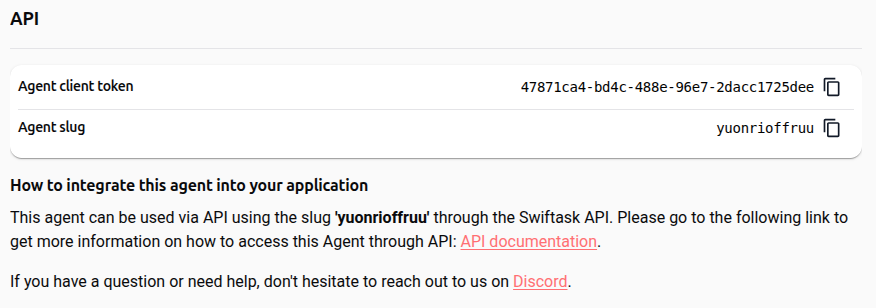
The agent slug and agent client token from Agent settings → Deployment → API (or an account-level API key from your profile's API section).
External platform permissions where needed (Slack workspace admin rights, Meta developer credentials, or website code access).
Step-by-step guide
Method 1: OpenAI SDK (recommended)
The OpenAI SDK method provides the quickest integration path for developers with existing AI implementations. Swiftask exposes an OpenAI-compatible endpoint that works directly with official OpenAI client libraries (Python, Node.js, TypeScript).
Generate your account API key from your profile's API settings.
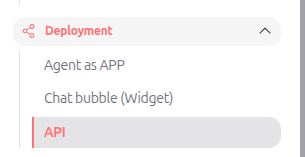
Locate your agent slug under Agent settings → Deployment → API.
Point your OpenAI client to the base URL
https://api.swiftask.fr/v1and supply your agent slug as themodelparameter.
Python standard call:
from openai import OpenAI

client = OpenAI(
    api_key="YOUR_API_KEY",
    base_url="https://api.swiftask.fr/v1"
)

response = client.chat.completions.create(
    model="AGENT_SLUG",
    messages=[{"role": "user", "content": "Analyze our quarterly report."}]
)

print(response.choices[0].message.content)
Python streaming call:
response = client.chat.completions.create(
    model="AGENT_SLUG",
    messages=[{"role": "user", "content": "Generate a summary."}],
    stream=True
)

for chunk in response:
    if chunk.choices[0].delta.content:
        print(chunk.choices[0].delta.content, end="")
Method 2: Direct REST API
The direct REST API provides programmatic HTTP access without SDK dependencies. This approach suits custom backend services, serverless functions, or languages without dedicated SDKs.
Retrieve your agent client token and agent slug under Agent settings → Deployment → API.
Send an HTTP
POSTrequest tohttps://graphql.swiftask.ai/api/ai/YOUR_AGENT_SLUG.Include your authorization header and JSON body parameters.
cURL example:
curl -X POST 'https://graphql.swiftask.ai/api/ai/YOUR_AGENT_SLUG' \
  -H 'Content-Type: application/json' \
  -H 'Authorization: Bearer xxxx' \
  -d '{
    "input": "Summarize customer incident report #402.",
    "sessionId": 12345,
    "messageHistory": [],
    "files": [],
    "documentAnalysisMode": "SIMPLE",
    "extraConfig": {
      "analysisDepth": "detailed",
      "includeReferences": true
    }
  }'
Request parameters:
Method 3: Webhook triggers
Webhook triggers allow external systems to start agent automations automatically when events occur.
Open your agent and select Automations → Triggers from the left navigation menu.
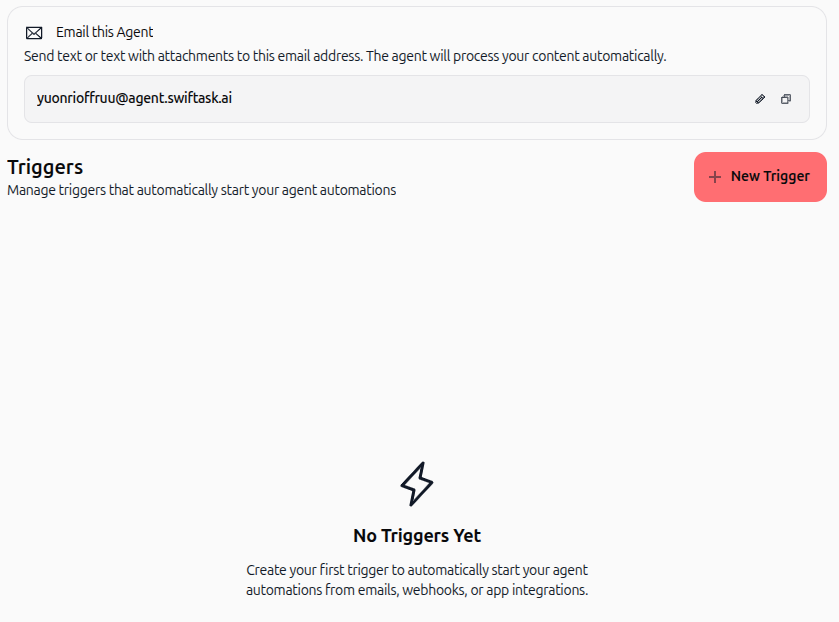
Review the triggers dashboard showing your agent's unique email address and existing automations.
Click the red + New Trigger button in the top-right corner.
Select Webhook ("Trigger via HTTP webhook URL. Perfect for integrating with external services.").
Enter a descriptive Trigger Name and click Next to review.
Click Create Trigger to finalize the trigger setup.
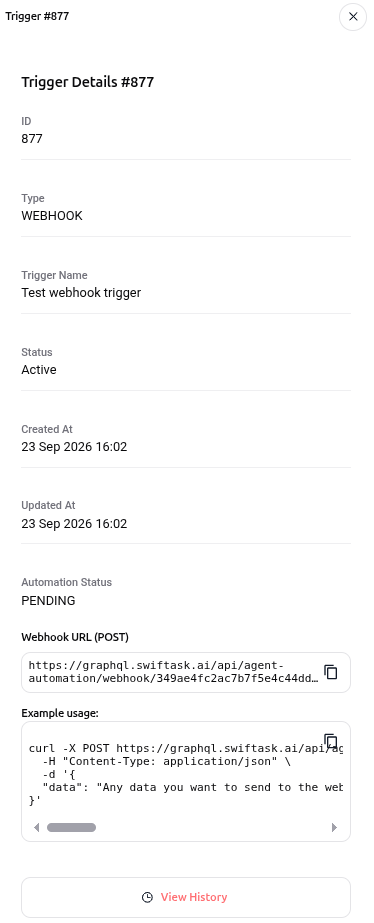
Click the created trigger card in your triggers list to open the Trigger Details sidebar and copy your unique Webhook URL (POST) (
https://graphql.swiftask.ai/api/agent-automation/webhook/[unique-id]).
Webhook invocation example:
curl -X POST https://graphql.swiftask.ai/api/agent-automation/webhook/[unique-id] \
  -H "Content-Type: application/json" \
  -d '{
    "data": "Customer feedback form submission payload"
  }'
Method 4: Direct email communication
Every Swiftask agent receives a dedicated email address for asynchronous request handling and document ingestion.
Open your agent and navigate to Automations → Triggers.
Locate the dedicated agent email address formatted as
agent-slug@agent.swiftask.ai.Send an email directly to this address or set up automated email forwarding rules in Gmail or Outlook.
Email thread and attachment handling:
Thread context: When users reply to an ongoing email exchange, Swiftask tracks the conversation thread. The agent maintains context across multiple turns without resetting memory.
Attachment processing: Files attached to incoming emails (PDF, DOCX, XLSX, images) are automatically extracted, parsed, and fed to the agent's knowledge reasoning.
Automated replies: Responses are delivered back to the sender's email address, and conversation logs are synchronized with the agent owner's chat history.
Method 5: Slack integration via Events API
The Slack integration allows team members to invoke agents directly within Slack channels and direct messages.
Create a custom Slack app at
api.slack.com/apps.In OAuth & Permissions, add the Redirect URL:
GET [backend_url]/slack/oauth_redirect.Configure the required bot token scopes (
app_mentions:read,chat:write,channels:history, andim:history).In Event Subscriptions, enable events and enter the Request URL:
POST [backend_url]/slack/events.Complete the URL verification challenge handshake, subscribe to bot events (
app_mention,message.im), and install the app to your workspace.
Once installed, team members can mention the agent using @agent-name in public or private channels to trigger responses.
Method 6: Facebook Messenger via dedicated page webhook
Agents can process customer inquiries sent to Facebook Business Pages using a dedicated system webhook.
Access your Meta App configuration within the Meta for Developers portal.
In the Messenger settings, enter the dedicated page webhook endpoint provided by Swiftask.
Provide your verification token to complete Meta's webhook validation handshake.
Subscribe the webhook to the
messagesandmessaging_postbacksevents for your Facebook Page.
When customers message your Facebook Page, Meta forwards the event to the webhook, and the agent generates replies back to the user's Messenger thread.
Method 7: Embeddable chat widget
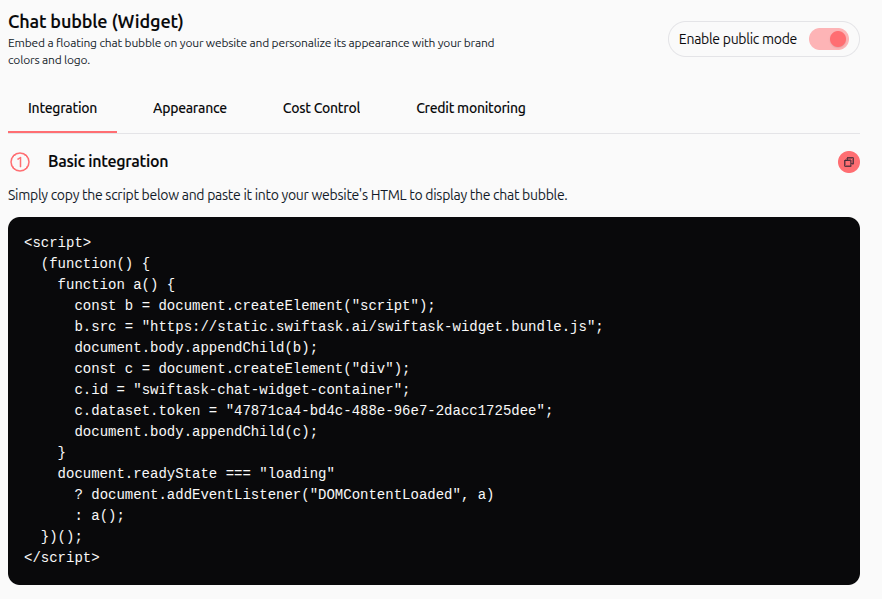
The embeddable chat widget provides a live conversation window for external websites.
Open your agent and expand Deployment in the left menu, then select Chat bubble (Widget).
Toggle Activate widget to ON.
Configure your widget styling, avatar icon, positioning, and floating starter questions.
Copy the integration script and paste it before the closing
</body>tag on your website.
Client token authentication:
For custom widget architectures, exchange the agent client token (from Deployment → API) for a temporary session:
curl -X GET 'https://graphql.swiftask.ai/public/widget-bot/YOUR_CLIENT_TOKEN' \
-H 'x-client-uuid: YOUR_UNIQUE_CLIENT_UUID'Always-on feedback collection:
User ratings: Thumbs up and thumbs down rating buttons are displayed automatically on every agent response.
Feedback review: Received ratings and user comments are logged in a read-only dashboard where managers can inspect, export, or delete entries.
Email notifications: Managers can set up email alerts to receive instant notifications whenever a user submits negative or positive feedback.
Channel comparison
Practical use cases
Asynchronous invoice intake via email
Suppliers send invoices directly to accounts-payable@agent.swiftask.ai. The agent reads the attached PDF, extracts payment amounts, answers vendor follow-up questions in the same email thread, and logs the parsed items into accounting software.
Internal engineering support on Slack
Developers mention @ops-assistant inside a Slack channel to query infrastructure runbooks. The agent responds inline within the channel thread, avoiding portal context switching.
Self-service website widget with quality tracking
A software company deploys the chat widget across its pricing page. Visitors ask pre-sale questions, while the sales director reviews ratings in the feedback dashboard and receives email alerts for low-score interactions.
Tips & best practices
Protect API credentials: Always store client tokens and API keys in server-side environment variables. Never expose them in public client-side repositories.
Leverage extraConfig for business metadata: Supply tenant IDs, user permissions, or custom processing flags inside the
extraConfigparameter during REST calls to tailor agent behavior.Implement rate limiting on widgets: Enable the message rate limit in widget advanced options to prevent bot spam and control credit usage.
Configure email forwarding rules: Route shared inboxes (such as support@company.com) to your agent's unique email address (
agent-slug@agent.swiftask.ai) with threading headers preserved.
Troubleshooting
Webhook calls return HTTP 400 or fail to execute
Cause: The HTTP request body is not formatted as valid JSON, or the Content-Type header is missing.
Fix: Ensure the request includes the
Content-Type: application/jsonheader and that the payload is valid JSON.
Email replies lose conversation context
Cause: The sending email server or forwarding script strips the
In-Reply-ToandReferencesheaders.Fix: Confirm your mail client or automated forwarding rule maintains standard RFC threading headers when sending to
agent-slug@agent.swiftask.ai.
Slack Events URL verification fails
Cause: The server did not respond to Slack's initial
url_verificationhandshake with the plainchallengeparameter.Fix: Verify your Slack Request URL endpoint returns the raw challenge string immediately upon receiving the verification event.
Additional resources
Access Swiftask agents via OpenAI SDK – Implementation guide for Python and JavaScript SDKs.
Access AI and Agent through API – REST and GraphQL API documentation.
Triggers from webhook – Setup instructions for incoming automation webhooks.
Direct email communication with AI agents – Configuring agent inboxes.
Embed and widget – Customizing and deploying website chat bubbles.
Was this helpful?
Still need help? Ask the team