Python Code Execution
Written By Stanislas
Last updated 4 months ago
Overview
The Python Code Execution skills lets you write and run custom Python functions as reusable skills in Swiftask. Instead of building complex workflows with predefined steps, you can define your own Python logic and have your agent execute it whenever needed. This is useful for data transformation, API integration, calculations, or any custom business logic.
Comparison with Python code interpreter:
The Python code interpreter allows agents to generate and execute Python code dynamically without predefined functions. In contrast, Python Code Execution requires you to define a specific function upfront with fixed parameters and structure. Choose Python Code Execution for repetitive, production-ready tasks with consistent inputs; use Python code interpreter for flexible, ad-hoc requests that need dynamic code generation.
Prerequisites
Access to the Swiftask skills management interface
Basic knowledge of Python syntax and function definition
Understanding of the Python packages your function requires (if any)
For API calls or external data access, ensure you have valid credentials and network access
Step-by-step guide
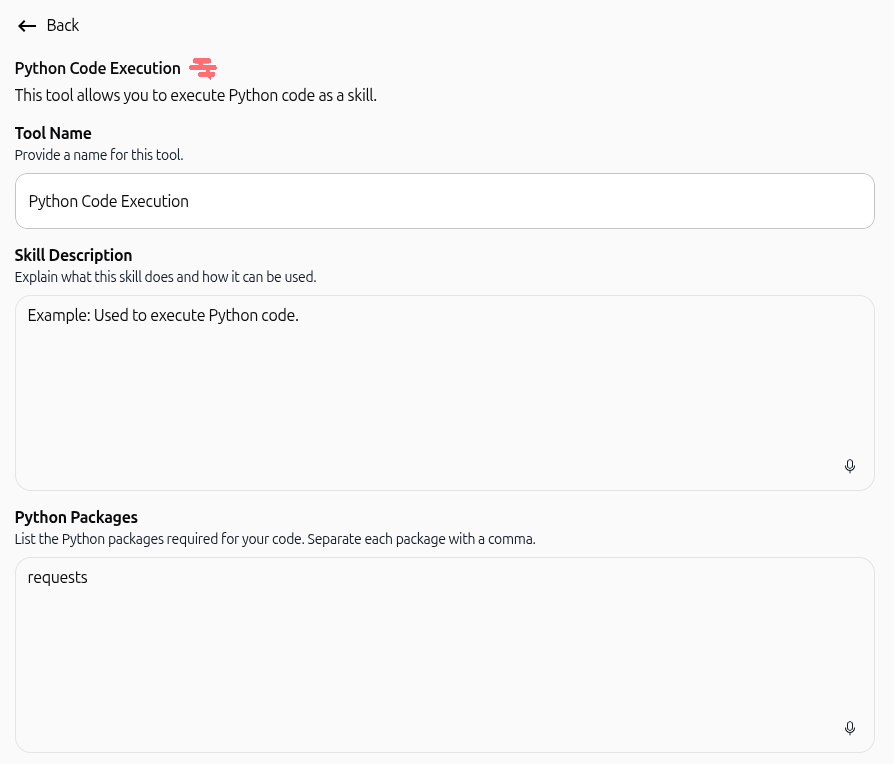
Step 1: Navigate to Python Code Execution
From the skills section, select Python Code Execution from the available tool categories.

Step 2: Enter a tool name
In the Tool Name field, provide a descriptive name for your tool (e.g., "Convert Currency," "Calculate Discount," "Parse JSON"). This name will appear when the agent selects this skill.
Step 3: Write a skill description
In the Skill Description field, explain what this tool does and when it should be used. Be clear about the tool's purpose so the agent understands when to invoke it. Example: "Used to convert amounts between different currencies using live exchange rates."
Step 4: List required Python packages (if applicable)
In the Python Packages field, list any external Python libraries your code needs, separated by commas. Leave this field empty if your code only uses Python's built-in modules. Example: requests, pandas, numpy
Step 5: Define function parameters (optional)
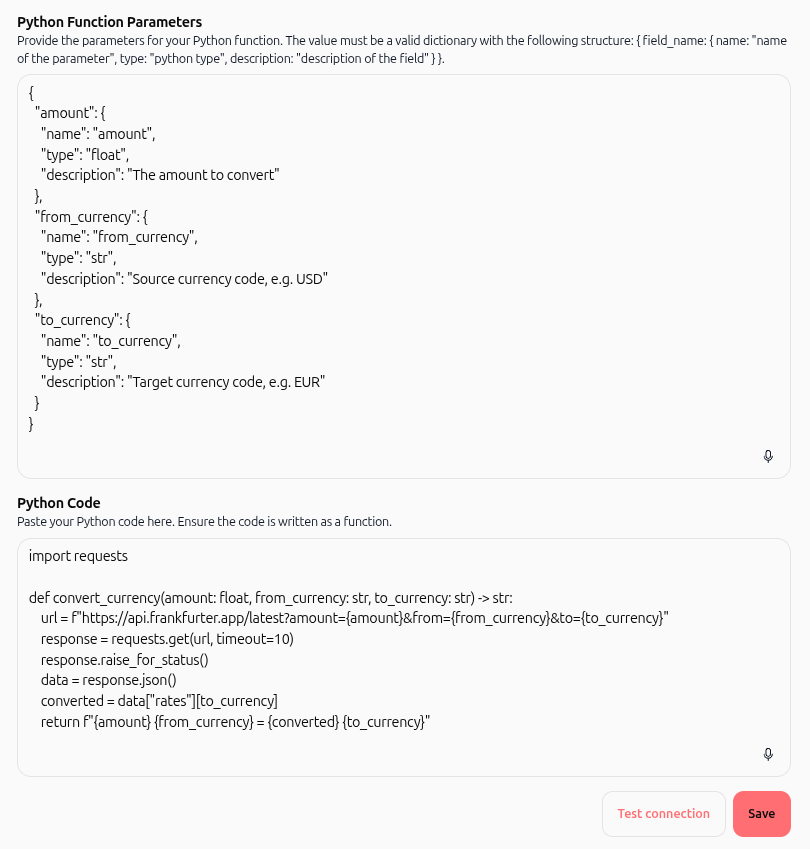
In the Python Function Parameters field, provide a JSON object describing each parameter your function accepts. Each parameter must include:
name: The parameter name (matches your function definition)type: The Python type (e.g.,str,float,int,bool,list,dict)description: What this parameter represents
If your function has no parameters, leave this field empty or enter {}.
Example with parameters:
{
  "amount": {
    "name": "amount",
    "type": "float",
    "description": "The amount to convert"
  },
  "from_currency": {
    "name": "from_currency",
    "type": "str",
    "description": "Source currency code (e.g. USD)"
  },
  "to_currency": {
    "name": "to_currency",
    "type": "str",
    "description": "Target currency code (e.g. EUR)"
  }
}
Step 6: Write your Python function
In the Python Code field, paste your complete Python function. You can include imports at the top of the code block, outside the function definition. The code must:
Include any necessary imports at the top (e.g.,
import requests)Contain a valid Python function definition (start with
def function_name():)Return a result (use
returnstatement)Handle errors gracefully if needed
Example:
import requests


def convert_currency(
    amount: float,
    from_currency: str,
    to_currency: str
) -> str:
    url = (
        f"https://api.frankfurter.app/latest"
        f"?amount={amount}"
        f"&from={from_currency}"
        f"&to={to_currency}"
    )

    response = requests.get(url, timeout=10)
    response.raise_for_status()

    data = response.json()
    converted = data["rates"][to_currency]

    return f"{amount} {from_currency} = {converted} {to_currency}"
Step 7: Test your tool
Click the Test connection button to validate your code. This will execute your function with sample data to ensure it works correctly before attaching it to an agent.
Step 8: Save the tool
Once testing passes, click Save to store your tool. It is now available for use in workflows and agent skills.
Practical use cases
Case 1: Currency conversion in a booking workflow
A travel agent needs to convert prices to the customer's local currency. You create a Python Code Execution tool that fetches live exchange rates and returns the converted amount, which the agent automatically applies to quotes.
Case 2: Data transformation and validation
A customer support agent receives unstructured user input (e.g., a phone number in various formats). Your Python tool normalizes the input, validates it, and returns a standardized format for database storage.
Case 3: Dynamic calculation based on conditions
An e-commerce agent calculates shipping costs based on weight, destination, and carrier. Your Python function implements complex business rules (e.g., bulk discounts, zone-based pricing) that would be cumbersome to set up with predefined steps.
Case 4: API integration for real-time data
Your agent needs to fetch weather data, stock prices, or inventory levels from an external API. A Python Code Execution tool wraps the API call, handles authentication, parses the response, and returns clean data to the workflow.
Tips & Best Practices
Keep functions focused: Each tool should do one thing well. Avoid creating a single massive function that handles multiple unrelated tasks.
Use meaningful parameter names: Clear parameter names help the agent understand what data to pass and make your code self-documenting.
Add error handling: Use try-except blocks to catch errors gracefully and return helpful error messages instead of crashing.
Test with realistic data: Before saving, use the Test connection button with actual data your agent will encounter.
Document your code: Add comments in your Python code to explain complex logic, especially if others will maintain it later.
Avoid long-running operations: Keep execution time short; long operations may timeout. For heavy processing, consider breaking it into smaller steps.
Use timeouts for API calls: When calling external APIs (like in the currency example), always set a timeout to prevent hanging.
Troubleshooting
Issue: "Test connection failed" or function does not execute
Cause: Syntax error in your Python code or missing imports.
Fix: Review your code for typos, ensure all imports are included, and verify the function definition is correct. Test a simple function first (e.g., def test(): return "hello") to confirm the environment works.
Issue: "Module not found" error
Cause: A required Python package is not listed in the Python Packages field or is not installed in the environment.
Fix: Add the package name to the Python Packages field (e.g., requests) and save. The system will install it before running your function.
Issue: Function parameters are not being passed correctly
Cause: Parameter names in the JSON definition don't match your function signature, or the JSON format is invalid.
Fix: Ensure the parameter names in the Python Function Parameters JSON exactly match the parameter names in your def function_name(param1, param2): line. Validate the JSON syntax using a JSON validator.
Issue: External API calls are timing out
Cause: The API is slow or unreachable, or your timeout value is too short.
Fix: Increase the timeout value in your requests call (e.g., timeout=30), verify the API endpoint is correct and accessible, and check your network connectivity.
When to use Python Code Execution vs. Python code interpreter
Additional resources
Python code interpreter : for dynamic code generation without predefined functions