Introduction to credits / consumption
Written By Stanislas
Last updated About 2 months ago
Learn how Swiftask credits work, what consumes them, and how different operations affect your credit balance.
Overview
Swiftask uses a credit-based system to measure your AI usage. Every AI interaction—from chat messages to document processing—consumes credits based on the complexity of the task and the resources required.
Understanding how credits work helps you make informed decisions about which AI models to use, how to structure your workflows, and how to optimize your spending. This guide explains what credits are, what consumes them, and how different factors affect your credit usage.
Prerequisites
To understand your credit consumption, you should:
Have an active Swiftask account
Be familiar with basic Swiftask features (Chat, Agents, Knowledge base)
Have access to your account settings to view credit usage
No technical knowledge is required—this guide is designed for all Swiftask users.
What are credits?
Credits are Swiftask's universal currency for AI operations. Think of credits as units that measure how much AI processing power you use.
Every AI operation consumes credits:
Sending a chat message
Generating an image or document
Processing uploaded files
Indexing documents in your knowledge base
Using agent skills and tools
Querying databases or APIs through agents
Your monthly credit allocation depends on your subscription plan. Once you understand what consumes credits, you can manage your usage more effectively.
How credits are calculated
Credit consumption follows a simple formula:

Base cost: A fixed cost per operation (e.g., starting a chat, creating an agent)
Credit cost: Varies based on:
The AI model you're using
The length of your input message
The length of the AI's response
Feature cost: Additional costs for:
File attachments and document processing
Knowledge base operations
Agent skills and tools
Integrations and connectors
AI model pricing
Different AI models have different credit costs. More powerful models cost more per interaction.
Available models and their costs
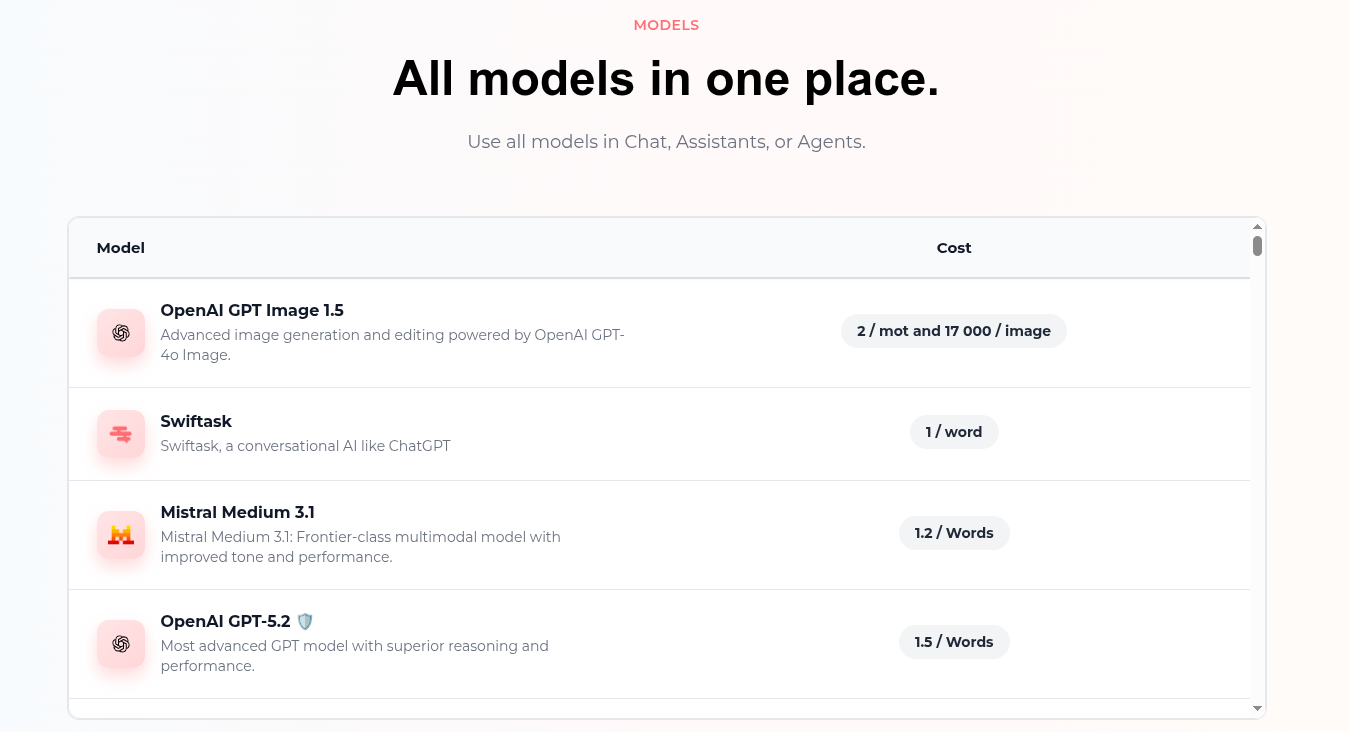
Key takeaway: Swiftask default agent is the most cost-effective for simple tasks. Claude 3 Opus is the most expensive but offers the highest quality for complex work.
Chat message credit consumption
Basic chat message
When you send a message in Chat, credits are consumed based on:
Your input message length
The AI's response length
The AI model selected
With conversation history
AI includes previous messages for context. Longer conversations consume more credits because the AI processes the entire history with each new message.
Tip: Longer conversations cost more. Start a new chat when the conversation becomes too long or changes topic.
Viewing credit consumption in chat
After each AI response, you can see how many credits were consumed.
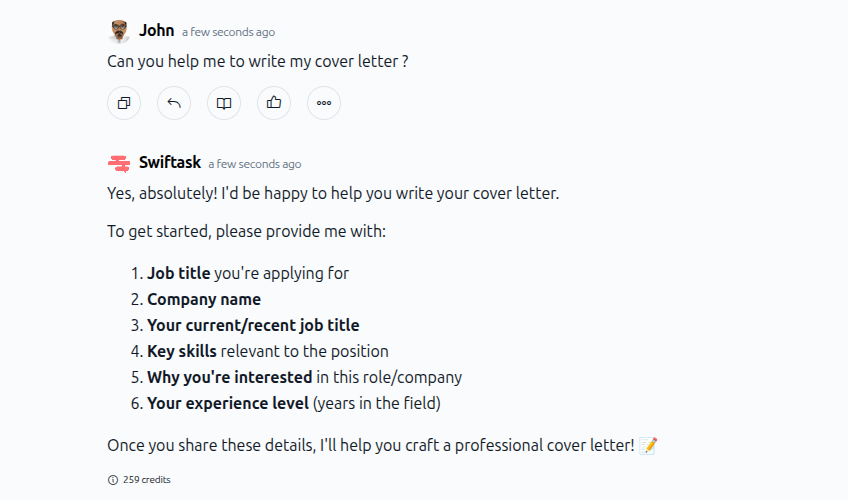
As shown in the image above, credit consumption appears at the bottom of each AI response (e.g., "259 credits"). This helps you understand the cost of each interaction in real-time.
File processing and document analysis
When you attach files to a chat message or upload documents to your knowledge base, Swiftask processes them and consumes credits based on file size and analysis complexity.
File attachment costs
What consumes credits during file processing:
Text extraction from PDFs
OCR (optical character recognition) for scanned documents and images
Table and structure recognition
Data parsing from spreadsheets (CSV, XLSX)
Code analysis from programming files
Knowledge base and document indexing
Adding content to your knowledge base consumes credits. The cost depends on:
The size of the documents you upload
The type of content (text files, PDFs, web pages, etc.)
The complexity of processing required
What consumes credits:
Uploading documents to your knowledge base
Importing web pages and websites
Syncing files from cloud storage (Google Drive, SharePoint, Dropbox)
Re-indexing updated documents
Tip: Upload documents to your knowledge base once and reuse them across multiple agents instead of attaching the same files repeatedly to chat messages.
Agent operations
When you use AI agents, credit consumption includes:
The AI model cost (same as chat)
Agent operation costs
Any skills or tools the agent uses
Agent costs
Agents consume credits each time they respond to a query. The cost depends on:
The AI model powering the agent
Whether the agent searches a knowledge base
Which skills or tools the agent uses (database queries, API calls, integrations)
Typical agent interaction:
Simple agent query: Lower cost
Agent with knowledge base: Moderate cost
Agent with multiple skills: Higher cost
Agent skills and tools
When agents use skills (integrations, database queries, API calls), each skill operation consumes additional credits.
Common skill operations:
Database queries
REST API calls
External integrations (CRM, project management tools, etc.)
Web searches
File generation
Tip: Only enable skills your agent actually needs. Each active skill can increase credit consumption.
Factors that affect credit consumption
1. AI model selection
The AI model you choose has the biggest impact on credit costs. Premium models like Claude Sonnet 4.5 cost significantly more than Swiftask default agent.
2. Message length
Longer input messages and longer AI responses consume more credits and therefore more credits.
Recommendation: Be clear and concise in your prompts. Avoid unnecessary context or repetition.
3. Conversation history
AI includes previous messages for context. The longer the conversation, the more credits each new message consumes.
Recommendation: Start a new chat when conversations become too long or change topics significantly.
4. File attachments
Attaching files—especially large PDFs or images—increases credit consumption significantly.
5. Knowledge base size
Agents connected to large knowledge bases may consume more credits as they search through more content to find relevant information.
Recommendation: Keep knowledge bases focused. Use multiple smaller data sources instead of one massive collection.
6. Agent skills and tools
Each skill or tool your agent uses consumes additional credits.
Recommendation: Only enable skills that are necessary for your agent's specific tasks.
Practical use cases
Optimize for routine tasks
Use Swiftask default agent for everyday tasks like:
Quick questions and answers
Simple text generation
Basic document summaries
Routine agent interactions
Reserve premium models (GPT-4, Claude) for:
Complex analysis
Creative writing
Detailed research
Critical decision-making
Manage file processing costs
Before uploading large files:
Check the file size (smaller files = fewer credits)
Consider splitting large documents into smaller chunks
For knowledge base:
Upload documents once and reuse them across multiple agents
Update existing documents instead of creating duplicates
Control conversation length
Start fresh when:
The conversation exceeds 20-30 messages
You're changing topics significantly
The AI starts referencing old, irrelevant context
Keep conversations focused:
Ask one question at a time
Avoid repeating information the AI already has
Use clear, direct language
Tips & best practices
Choose the right model for the task
Don't use premium models for simple tasks. Match the model to the complexity of your work.
Keep messages concise
Longer messages consume more credits. Be clear and direct in your prompts to reduce unnecessary credit usage.
Use knowledge base instead of repeated attachments
If you frequently reference the same documents, add them to your knowledge base once instead of attaching them to every chat message.
Monitor your usage regularly
Check your credit usage dashboard weekly to identify patterns and optimize your workflows.
Start new conversations when needed
Long conversation histories increase credit consumption with each new message. Start fresh when conversations become too long.
Disable unnecessary agent skills
Only enable skills your agent actually needs. Each active skill can consume additional credits.
Troubleshooting
Issue: Higher than expected credit usage
Possible causes:
Using premium AI models for simple tasks
Long conversation histories
Agents with many active skills
Solutions:
Check your credit usage dashboard to identify which operations consumed the most credits
Switch to Swiftask default agent for routine tasks
Start new conversations instead of continuing very long ones
Review and disable unnecessary agent skills
Issue: Unexpected credit consumption for a single message
Possible causes:
Large file attachment
Very long AI response
Agent using multiple skills or database queries
Solutions:
Check the credit indicator at the bottom of the AI response
Review the file size if you attached documents
Check if the agent used any skills or tools (visible in the response)
Issue: Credits depleted mid-month
Possible causes:
Underestimated monthly usage
Increased activity or new use cases
Inefficient workflows consuming more credits than necessary
Solutions:
Review your credit usage dashboard to identify high-consumption activities
Optimize your workflows using the tips in this guide
Consider upgrading your plan if your usage consistently exceeds your allocation
Set up low credit alerts in your account settings
Ready to optimize your credit usage? Start by reviewing your consumption patterns in Account Settings → Credit usage, then apply the optimization strategies from this guide to reduce unnecessary spending.
Was this helpful?
Still need help? Ask the team