Introduction to Agents
Written By Stanislas
Last updated 8 months ago
Agents are custom AI assistants built for specific purposes. Each agent has its own objectives, knowledge base, and skills—giving you specialized expertise without leaving Swiftask. Use agents for repeated, specialized tasks like document analysis, customer support, or custom workflows.
Overview
Agents are AI assistants configured to handle specific types of work. Unlike Chat (which is general-purpose), agents are pre-configured with:
Objectives and instructions – Specific guidance on what the agent should do
Knowledge base – Documents and data sources the agent can access
Skills – Tools and integrations the agent can use (sending emails, querying databases, retrieving data, etc.)
Each agent is optimized for its purpose and produces better results for specialized tasks than a general AI model would.
When to use agents
Use agents when you need:
Specialized, repeatable work – Document analysis, customer support, marketing strategy, compliance review
Consistent results – The same task performed the same way every time
Specific knowledge – Access to documents, databases, or custom data your agent knows about
Workflow automation – Tasks that follow a predictable pattern
Use Chat instead if you need quick answers to one-off questions or want to explore ideas without a specific workflow.
Prerequisites
To use agents, you need:
A Swiftask account (sign up at swiftask.ai)
Access to Chat
Agents created or shared with you in your workspace
Agents are available to all Swiftask users. If you don't see any agents, you may need to create one first or ask a teammate to share an agent with you.
Accessing agents
From the Agents section:
Click Agents in the left sidebar
Browse available agents in these categories:
All agents – All agents in your workspace
Personal – Agents you've created or customized
Shared with me – Agents shared by team members
Collections – Agents organized by category (e.g., Commercial, Marketing)
Toolbox – Access automations and skills
From Chat:
Navigate to Chat in the left sidebar
Locate the agent selector dropdown on the left side of the input field (by default, it shows "Swiftask" as the active agent)
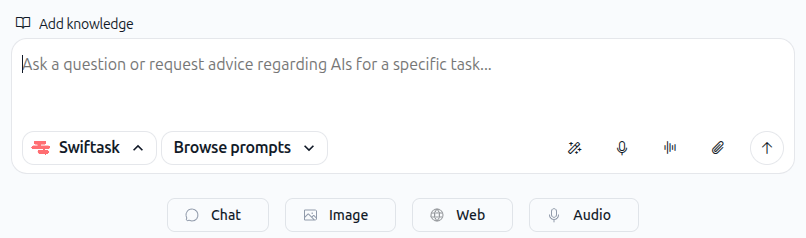
Click on an agent card to switch to that agent:
Select "My agents" section
Select a different agent from the list
Each agent card shows the agent name, description, avatar, and cost indicator
Click any agent card to switch to that agent instantly. The agent becomes active, and you can now chat with it.
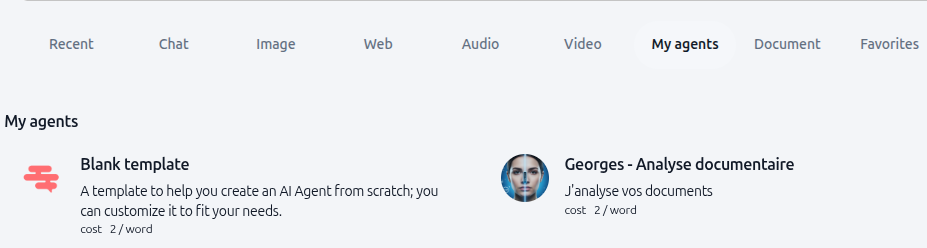
Start chatting with the agent:
Type your message in the input field
Ask the agent to perform tasks related to its specialty
Attach files for the agent to analyze (if configured)
Use all standard Chat features (voice input, file uploads, etc.)
The agent will respond using its configured knowledge base, skills, and instructions
Switch to a different agent:
You can switch to another agent at any time in the same conversation
Key capabilities
What agents can do:
Analyze documents using their knowledge base
Answer questions based on specific data sources
Perform specialized tasks (customer support, marketing, compliance, etc.)
Access multiple integrations and tools
Maintain context across conversations
Provide consistent, specialized responses
What agents cannot do:
Access information outside their configured knowledge base
Perform tasks outside their objectives and instructions
Use skills that haven't been configured for them
Access real-time information unless a skill is configured for it
Limitations
Credit consumption:
Each agent interaction consumes credits. The cost varies based on:
The agent's configured model
The length of your message and the agent's response
Any files you attach
Skills the agent uses (integrations, database queries, etc.)
Configuration requirements:
Agents must be properly configured to work effectively:
Sources (knowledge base connections) must be valid and accessible
Skills must have required parameters configured
Instructions and objectives must be clear and specific
What's next
Now that you understand what agents are and how to use them, explore:
Using an agent for the first time – Create your first custom agent
Browse and change AI models – Learn when to use different AI models vs. agents
Attaching files & documents – Upload files for agents to analyze
Agent features – Learn more about building and configuring agents
Ready to use agents? Click on an agent card now and start chatting with a specialized AI assistant.