Create tasks by speaking: your agent handles the rest
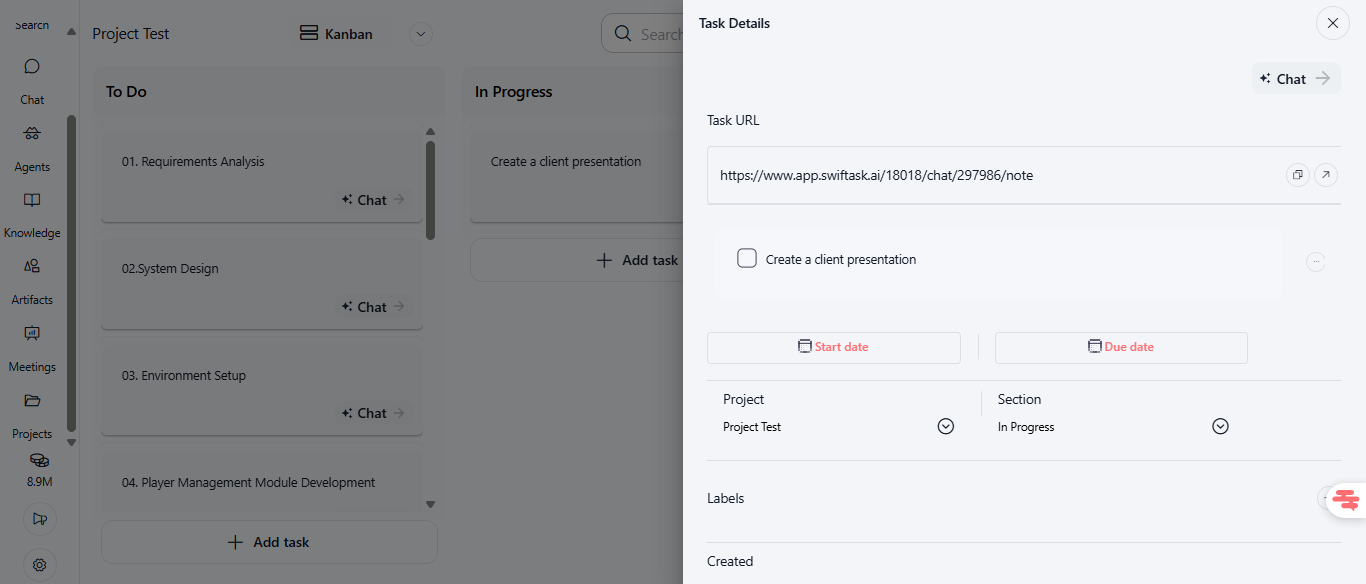
You can plan your projects in the Projects section on Swiftask and organize your tasks in Kanban mode with AI assistance. We've now significantly enhanced task creation and agent assignment. Discover how to get the most out of it.
Tell your agent to create a task in your Kanban
Create tasks by voice-dictating your request directly to an AI agent. State your mission in one sentence and the agent automatically generates the task title and description. This new conversational interface replaces the old multi-step form with a unified, intuitive flow.
Real example: Say "Create a client presentation" and the agent instantly generates the complete task with title and description.
Features:
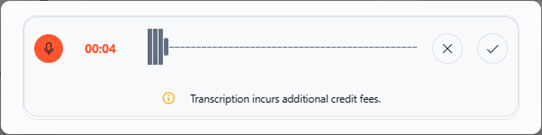
Automatic voice transcription with no time limits
Support for all languages
Integrated agent selection in the creation process
AI-powered automatic title and description generation
Instant delegation to your selected agent
To try it out:
Go to Projects → [Your project] → + Add task
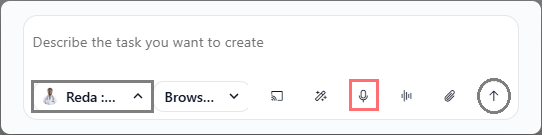
Click on agent selection in the bottom left
Enable voice input (microphone icon)
Dictate your task in one sentence
Send with the arrow button (bottom right)
The agent will automatically create the complete task and be immediately available to assist you.
Improvements
Unified creation interface
No more complex forms with separate fields for title, description, and assignment. Now create your tasks in a chat-style interface that combines all these steps into a single conversational flow. Result: faster task creation with less friction.
Streamlined team assignment
Assign tasks to your team members directly through the task setup. Each task has a dedicated chat where agents can automatically start assisting from the moment of creation.
Availability
All users — This feature is available to all Swiftask users, regardless of their plan.
All platforms — Works seamlessly in browser and desktop app.
No prerequisites — No setup required.
Ready to try it? Open a project right now and click + Add task to discover the new voice interface. Your AI agents are waiting for your instructions.