Talk to your agents, hands-free — June 2026 Update
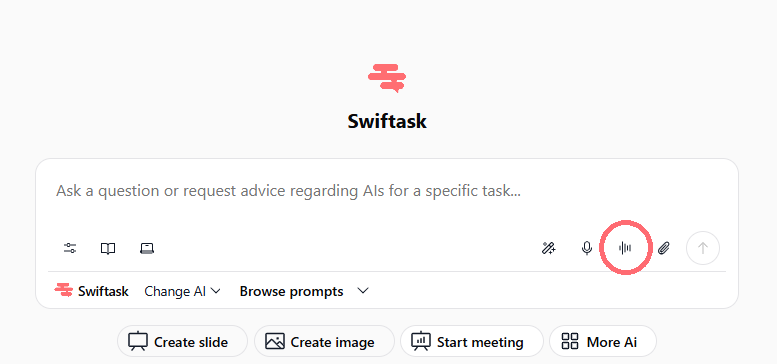
We're excited to introduce voice mode beta in chat, making it easier than ever to interact with your agents naturally. No more typing, no transcription steps, just speak and get instant answers.
Voice mode: Natural conversation with your agents
You can now chat with any agent using your voice. Click the voice icon next to the microphone in the chat input, speak your question or request, and your agent responds immediately with a text answer. It's that simple, no need to review transcriptions, no manual send button, no extra steps. Perfect for quick questions, hands-free work, or when typing isn't convenient.
Available everywhere: Works with all agents (including your custom agents) and all LLM models, across all Swiftask plans
Supported languages: All languages supported by Swiftask meeting recording
Zero setup for users: Voice mode is ready to use directly in Chat → just click and speak
Configurable per agent: For your custom agents, enable or disable voice mode on an agent-by-agent basis via the Agent Voice Settings menu.
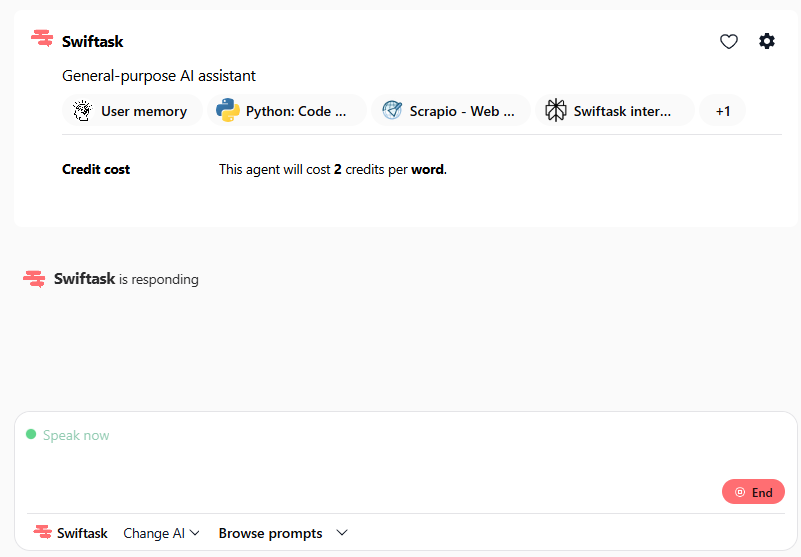
Visual feedback: A "Speak now" indicator appears when voice mode is active, so you always know when Swiftask is listening
Browser-friendly: No browser restrictions, use voice mode on desktop, tablet, or any device with microphone access
How to test voice mode
For Users:
Open any agent chat in Swiftask.
Locate the voice icon (red circle) next to the microphone icon in the chat toolbar.
Click the voice icon to activate the mode.
Speak your question or command clearly.
Watch the "Speak now" indicator while you talk.
Once you finish speaking, the agent responds immediately in text.
Continue the conversation via voice, or switch back to typing whenever you like.
For Admins (Custom Agent Configuration):
Access your custom agent.
Navigate to Agent Voice Settings.
Enable or disable voice mode according to your needs.
Save your changes.
Pro tip: Voice mode works great for brainstorming, quick lookups, and hands-free workflows. Try asking your agent for advice, summaries, or code help, all without typing a single word.
What's next for voice mode
This is the beta launch. We're working on voice responses from agents (so your agent can talk back to you), and we'll continue refining based on your feedback. Let us know how voice mode works for you!