Document uploads in chat, now lightning-fast — June 2026 Update

Sharing documents with your AI agents just got dramatically faster and more reliable. We've optimized the entire document upload experience in the chat, from the moment you select a file to when you can start asking questions about it. No more waiting, no more confusion.
Instant document uploads with real-time progress
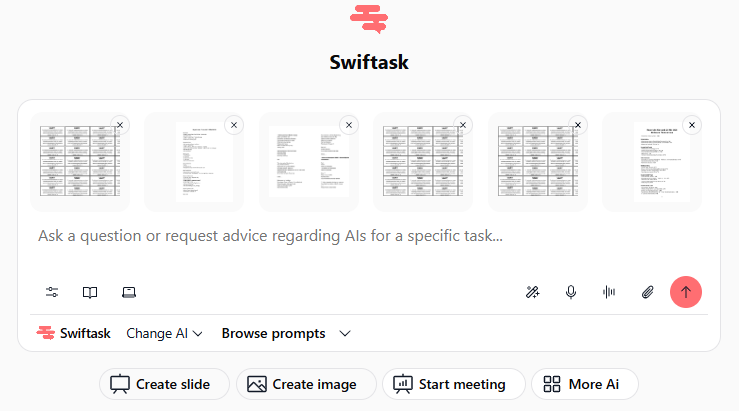
You can now upload documents to your chat with significantly faster processing. Instead of staring at a loading spinner, you'll see exactly what's happening: which files are uploading, which are being processed, and when they're ready to ask questions about.
Parallel processing: Multiple documents upload simultaneously instead of one at a time
Live progress indicators: Clear visual feedback showing upload status, processing stage, and completion
Instant availability: Ask questions about your documents the moment processing completes, no artificial delays
Supports all file types: PDF, Word documents, Excel spreadsheets, images, CSV files, JSON, and more
Handles large files smoothly: Optimized for files up to 100 MB without performance degradation
Available on: All Swiftask plans
We fixed the bugs that were slowing you down
Chained uploads now work reliably. Previously, uploading multiple documents in quick succession could cause the system to get stuck or process requests twice. That's gone. Upload as many files as you need, they'll all process in parallel without conflicts.
Error messages are now actually helpful. Instead of cryptic technical errors like "loading chunk fail," you'll now see clear, human-friendly messages that explain exactly what went wrong and how to fix it. Can't process that file format? We'll tell you. File too large? We'll suggest a solution.
No more duplicate responses. We fixed the issue where the AI would sometimes generate two responses to a single prompt after uploading a document. Now you get one clear, focused answer every time.
How to test this
Open the Chat in Swiftask
Click the attachment icon (paperclip) in the message input area
Select one or multiple documents from your computer
Watch the live progress indicators show real-time upload and processing status
Once complete, ask a question about your documents: "Summarize this PDF" or "Extract the key data from this spreadsheet"
Verify: Response appears instantly without delays, and you get only one response per question
Test with different file types: Try uploading a PDF, an Excel file, and an image together to see parallel processing in action.
Why this matters
Document handling is core to how AI agents work, whether you're analyzing contracts, extracting data from spreadsheets, or asking questions about research papers. Every second saved adds up, especially when you're processing multiple files. This update removes the friction from that workflow, letting you focus on what matters: getting insights from your data.
Ready to upload faster? Open Swiftask Chat now and experience the difference. 🚀