Find the right conversation in seconds — April 2026 Update
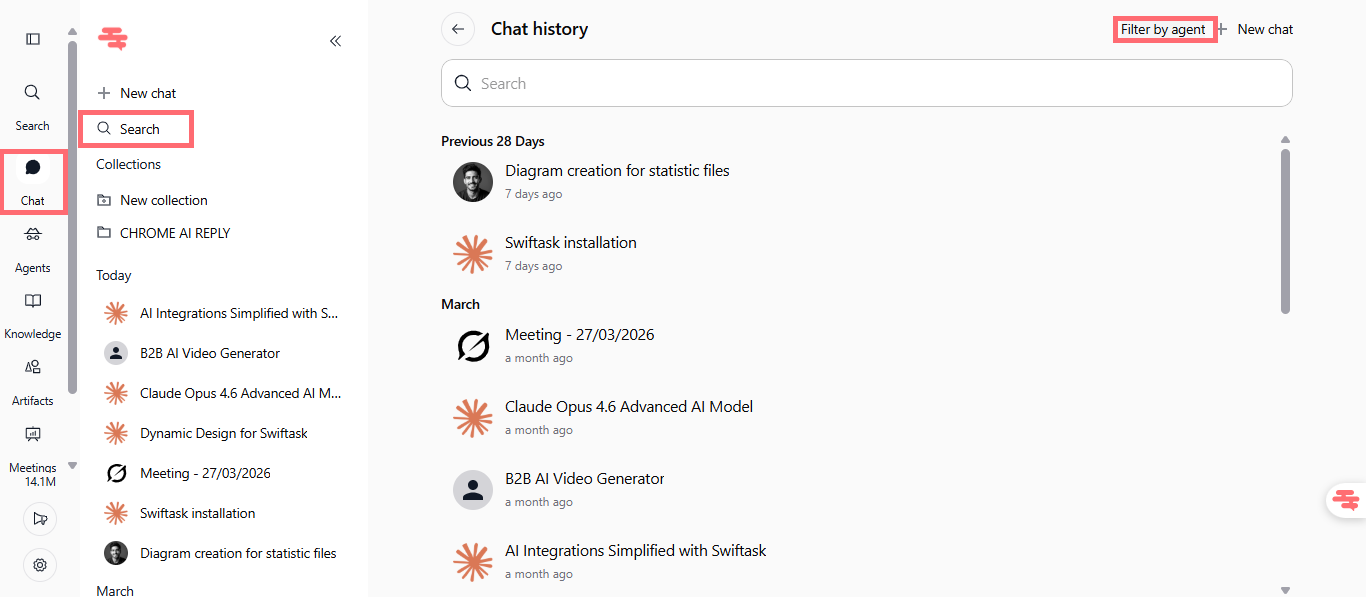
Managing multiple agent conversations just got easier. We've added smart filtering to your chat history, and conversations now stay organized the way you work.
Filter conversations by agent
You can now quickly find conversations by agent directly in your chat history. Use the "Filter by agent" button at the top right of your search field to filter by agent, or search by agent name to instantly find the conversations you need.
Find it in: Chat Hub (left sidebar) → Search field → "Filter by agent" button
Search by: Agent name or use the dropdown filter
Available on: All plans (Pro, Team Starter, Team Growth, Tailored/Enterprise)
How to test it:
Open the Search field in the Chat Hub from your left sidebar
Look for the "Filter by agent" button at the top-right of your search field
Click the dropdown or use the search field to type an agent name
Your conversation list instantly filters to show only that agent's sessions
Active conversations stay at the top
Chat sessions now automatically move to the top of your list whenever a new message is sent. Your most active conversations are always within reach, keeping your focus on what matters.
Enabled by default for all users
No configuration needed, it just works
How to test it:
Open a chat conversation from your history
Send a message to the agent
Return to your chat history, the session should now appear at the top of the list
Send messages to different agents and watch the list reorder automatically