Give team members a credit boost when they need it — June 2026 Update
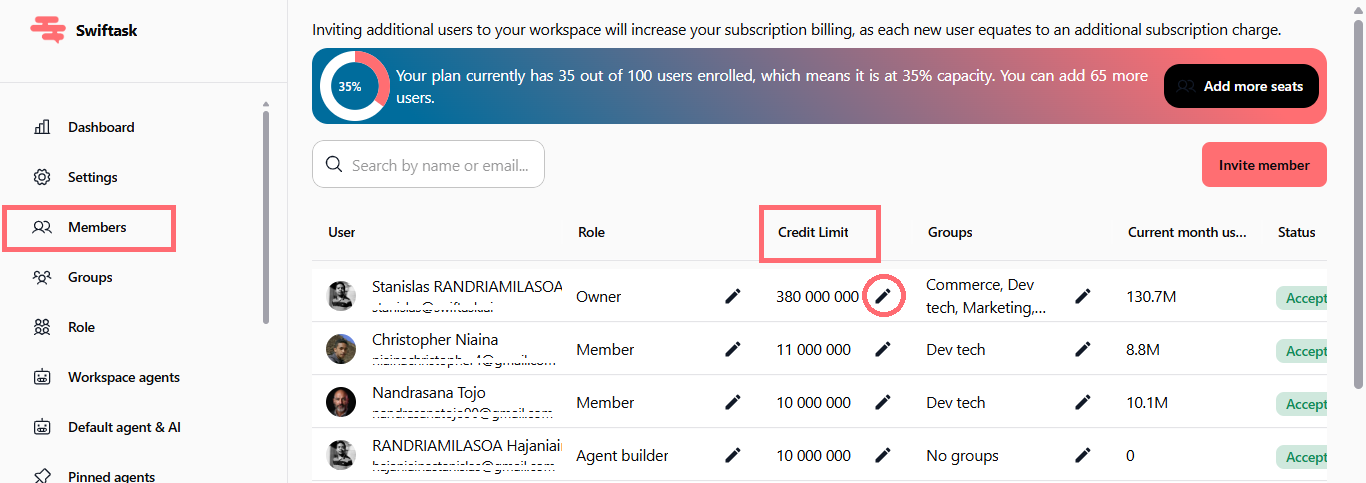
Admins can now assign temporary credit to individual workspace members, handling seasonal spikes and urgent requests without changing permanent credit limits. Set an expiration date, and the temporary allowance automatically resets when it expires.
Temporary credit limits for individual members
Give any team member an immediate credit boost without modifying their permanent monthly limit. Perfect for handling unexpected demand, seasonal projects, or helping someone finish an important task. The temporary credit sits on top of their existing limit and expires on a date you control.
Set credit amount: Choose how much temporary credit to grant, up to your workspace's remaining balance
Customize expiration: Default expires at the end of the month, but you can set any date you want
One-time override: Temporary credit replaces a member's monthly limit only until it expires; their permanent limit stays unchanged
Apply to multiple users: Use the "Apply to all users" toggle to grant the same temporary credit to your entire team at once
No extra cost: Temporary credit comes from your workspace's balance; no additional charges
Where to find it: Settings → Workspace → Members, click the edit icon (pencil) next to a member's Credit Limit, then toggle "Temporary credit limit" on.
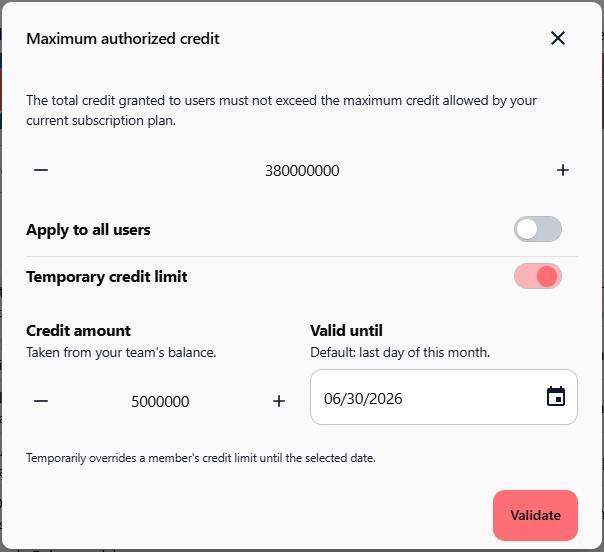
How to test it
Go to Settings → Workspace → Members
Click the edit icon next to any member's credit limit
Toggle on "Temporary credit limit"
Enter a credit amount (up to your remaining workspace balance)
Set the expiration date (default is the last day of this month)
Click Validate
Verify the member's credit limit now shows the temporary amount
Confirm the limit resets on the expiration date
Available on: All plans (Pro, Team Starter, Team Growth, Tailored)