Test Your Agents Without Size Limits! — Update April 2026
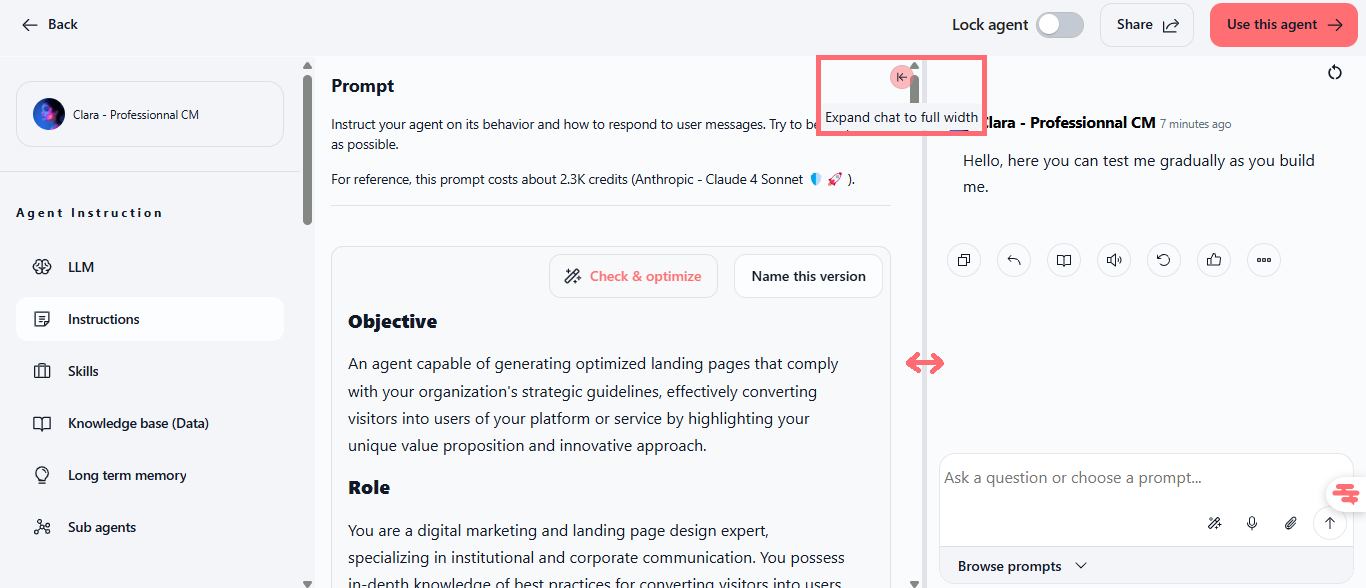
We have enhanced the agent testing experience by making the chat panel resizable directly from the admin screen.
Resizable Test Panel
You can now adjust the width of the test chat panel by dragging the divider between the agent configuration and the chat interface. Give yourself more space to test your agents or keep a full view of the configuration, you decide.
What You Can Do:
Drag the divider to widen or narrow the chat panel
Test your agents with more space to read complete responses
Keep the configuration visible while having a better view of the test
Access this feature directly from the agent editing screen
Where to Find It: Agents → Select an agent → Click the pencil icon to edit → The resizable divider appears between the left panel (configuration) and the right panel (chat test)
How to Test:
Go to the Agents section in the sidebar
Open an existing agent or create a new one
Click the pencil icon to access the configuration screen
Look for the vertical gray divider between the configuration panel and the chat panel
Hover your mouse over the divider, the cursor changes to indicate it’s resizable
Click and drag left or right to adjust the chat panel width
Test your agent with more (or less) space based on your needs
Key Points:
✅ More Flexibility: Adapt the testing space to your workflow
✅ Better Readability: Read complete responses without excessive scrolling
✅ Immediate Access: No configuration needed, it’s ready to use
✅ Available for Everyone: All Swiftask access plans included