Your agents, your users' credentials, your control — Update March 2026
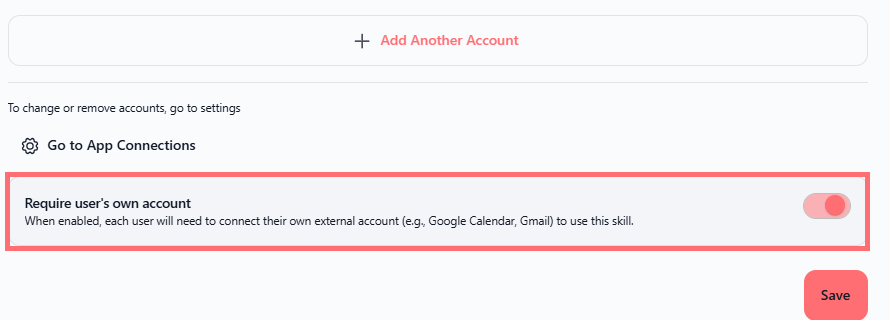
We've added a powerful new way to keep data private and accountability clear when sharing agents with your team. Meet the "Require user's own account" toggle—a simple but important security feature for external integrations.
Agents now respect user credentials for external services
When you share an agent that uses external integrations (Gmail, Google Drive, Slack, Outlook, Microsoft Teams, or any calendar service), you can now require users to authenticate with their own accounts instead of using yours.
Here's what changes:
Each user's data stays on their account – When someone uses a Gmail skill, they use their Gmail account, not yours. Their emails, files, and actions are completely separate.
Clear accountability – Every action is traceable to the person who performed it, not to the agent owner.
Automatic permission respect – Users can only access what their own account permissions allow. No surprises, no over-sharing.
One-time setup – Users configure their account once when they first access the agent, then everything works seamlessly.
How to set it up
Navigate to Agents → select your agent → click the edit icon (✏️)
Go to Skills in the left panel
Click Add a skill or edit an existing external skill (Gmail, Google Drive, Slack, Outlook, Calendar, etc.)
Fill in the skill configuration form
At the bottom of the form, toggle "Require user's own account" on
Save and share your agent normally
That's it. When recipients access the agent, they'll see a "Configuration required" banner and can authenticate with one click.
Available on: All Swiftask plans
Works with: Gmail, Google Drive, Slack, Outlook, Microsoft Teams, Google Calendar, Outlook Calendar, and all external service integrations
Does not apply to: Internal Swiftask skills (only external integrations)
What your users will see
They open a shared agent that has this toggle enabled
A blue "Configuration required" banner appears
They click "Configure" and authenticate with their own account
They're done—the agent now uses their credentials for all external actions
Why this matters
Privacy first – Personal data (emails, files, calendar events) stays on the user's account
Compliance ready – Perfect for regulated industries where audit trails and individual accountability are essential
No credential sharing – You never have to share your Gmail, Slack, or calendar access with teammates
Respects existing access – If someone doesn't have permission to a resource in their own account, they can't access it through the agent either
Test it now
Create or edit an agent with an external skill (try Gmail or Google Drive)
Enable the "Require user's own account" toggle
Share the agent with a test user (different account)
Log in as the test user and open the shared agent
Look for the "Configuration required" banner
Click "Configure" and authenticate
Send a test message that triggers the skill
Verify the action used the test user's credentials, not yours
Ready to share securely? Open any agent, add an external skill, enable the toggle, and share with confidence. Your team's data stays where it belongs—with them. 🔒