Stop hunting for your knowledge syncs. Manage them all from one place. — July 1, 2026 Update
Until now, tracking your automatic knowledge syncs meant opening each source one by one. No overview. No central control. No easy way to know when your next sync would run.
Today, we're fixing that.
✨ New: Knowledge auto sync menu
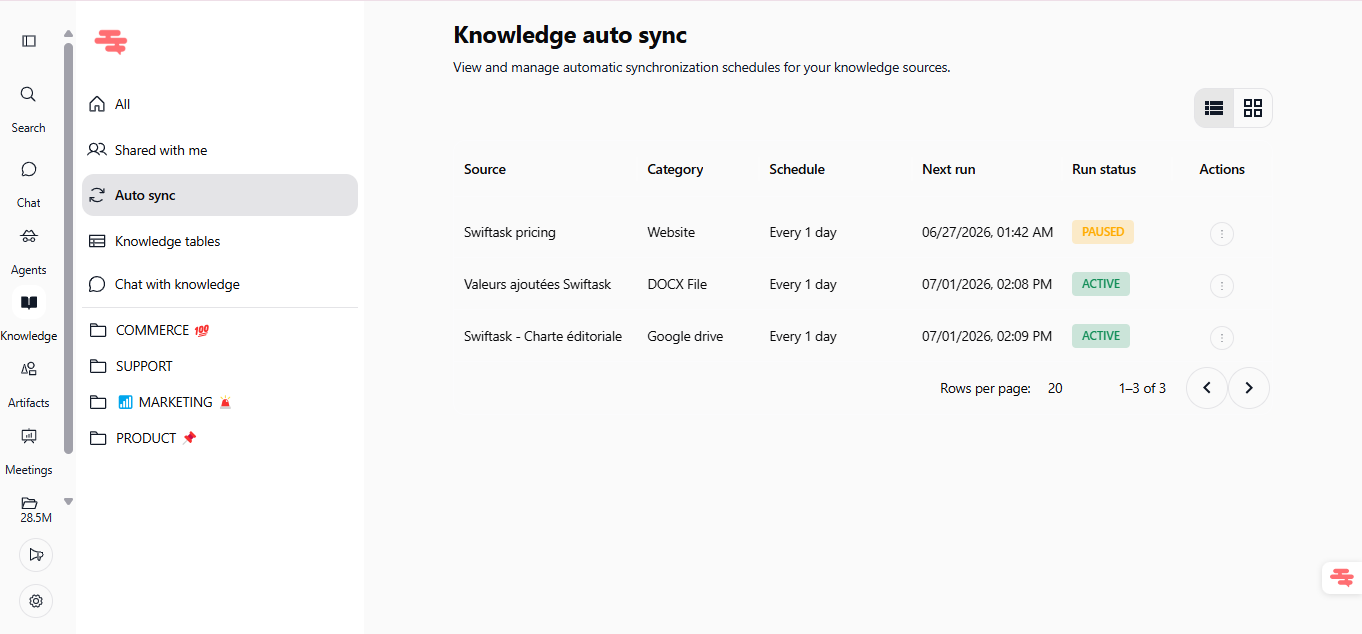
A dedicated dashboard to view, monitor, and control every automatic sync across your knowledge sources, in one click.
Find it in Knowledge → Auto sync (left sidebar).
What you get:
Full overview of every active sync: source, category, schedule, next run, and status
Real-time status indicators: instantly see what's ACTIVE or PAUSED
One-click actions: pause, resume, or delete any sync without leaving the dashboard
Immediate propagation: changes on your synced sources reflect in your agents right away
Flexible schedules: hourly, daily, weekly, monthly, with custom intervals
Supported sources: Google Drive, SharePoint, Dropbox, websites, and document files
Available on all plans: Pro, Team Starter, Team Growth, and Custom
💡 Why it matters
Your agents are only as good as the knowledge they have access to. When your docs, drives, and pricing pages update, your agents need to know instantly.
The Auto sync menu gives you the control layer that was missing: less time babysitting syncs, more time letting your AI work on fresh data.
🧪 Try it now
Open Knowledge in the left sidebar
Click Auto sync
Review your active syncs and their next scheduled runs
Pause, resume, or delete any sync in one click
One dashboard. Every sync. Full control.
Join our webinar on building a fleet of cold-emailing agents to save time on your prospecting.