Swiftask Update — February 2026: See your automations in time
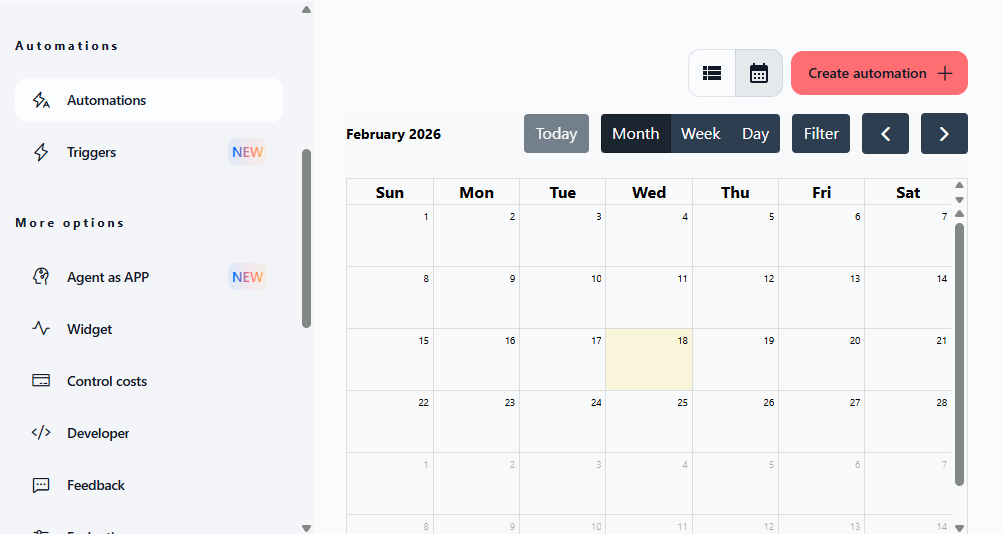
Planning your agent automations just got a whole lot easier. We've added a visual calendar interface that transforms how you schedule and manage your AI workflows, making it simple to see your automation timeline at a glance.
Calendar view for agent automation
You can now visualize and schedule your agent automations using a clean calendar interface instead of the traditional table format. Perfect for planning recurring tasks, scheduling one-time automations, and getting a visual overview of your automation timeline.
Switch between table and calendar views with toggle buttons
Click any date to create an automation with pre-filled start date
Navigate by month, week, or day with dedicated view controls
Filter automations to find specific scheduled tasks
Visual indicators show existing automations on calendar dates
Navigate between months using arrow controls or jump to today
Available on all plans with no limits on the number of automations displayed.
Find it in Agents → [Agent Name] → Automations → Calendar view icon.
How to test it: Open any agent, go to Automations, click the calendar view icon (next to the table view icon), then click on any date to create a new automation and see how the start date gets automatically filled.
Improvements
Enhanced automation scheduling workflow with visual calendar interface makes it easier to plan and organize your agent tasks across time, helping you avoid scheduling conflicts and better manage automation timelines.