Fine-tune your shared agents : new interface controls for embedded widgets — June 2026 Update
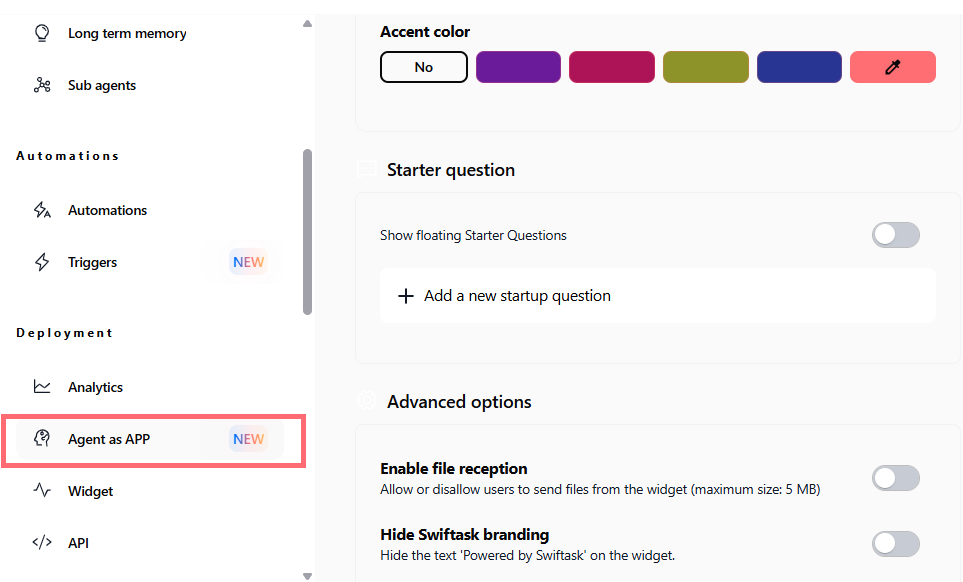
We've added two new configuration options to give you more control over how your shared agents appear and behave when embedded on your website or app. Customize the conversation experience to match your needs.
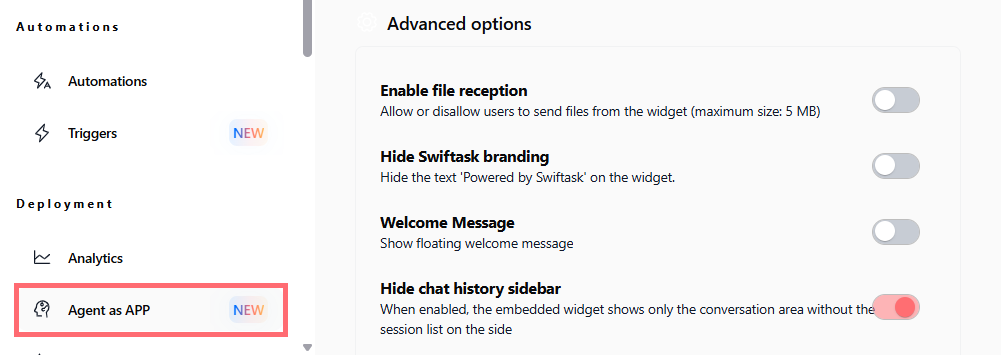
Hide the chat history sidebar
You can now toggle the conversation history panel on or off in your embedded agent widget. When disabled, the chat takes up the full width, giving more screen space to longer conversations.
Find it in: Agent profile → Advanced options → "Hide chat history sidebar"
Enabled by default: Off (history sidebar visible)
Available on: All plans (Pro, Team Starter, Team Growth, Custom)
Control skill visibility in conversations
New granular control over how skill executions (tools, thinking steps, etc.) appear in the chat. Choose to show everything or hide specific skill details to reduce visual clutter.
Find it in: Agent profile → Advanced options → "Skills display in chat"
Options: "Show everything" (default) or custom visibility per skill
Available on: All plans (Pro, Team Starter, Team Growth, Custom)

Why this matters
These improvements apply to shared agents embedded via iframe, perfect for teams deploying agents on public-facing websites or internal portals.
Maximize screen space for conversation-heavy workflows
Reduce cognitive load with cleaner interface options
Match your brand's UX preferences
No code changes needed : configure once, deploy everywhere
How to test it
Go to your agent profile
Scroll to Advanced options
Toggle "Hide chat history sidebar" to remove the session list from your embedded widget
Toggle "Skills display in chat" to control how tool executions and thinking steps appear
Preview the changes directly in your embedded widget
Available now on all plans.