See how your agents work together, all in one place! — Update March 2026
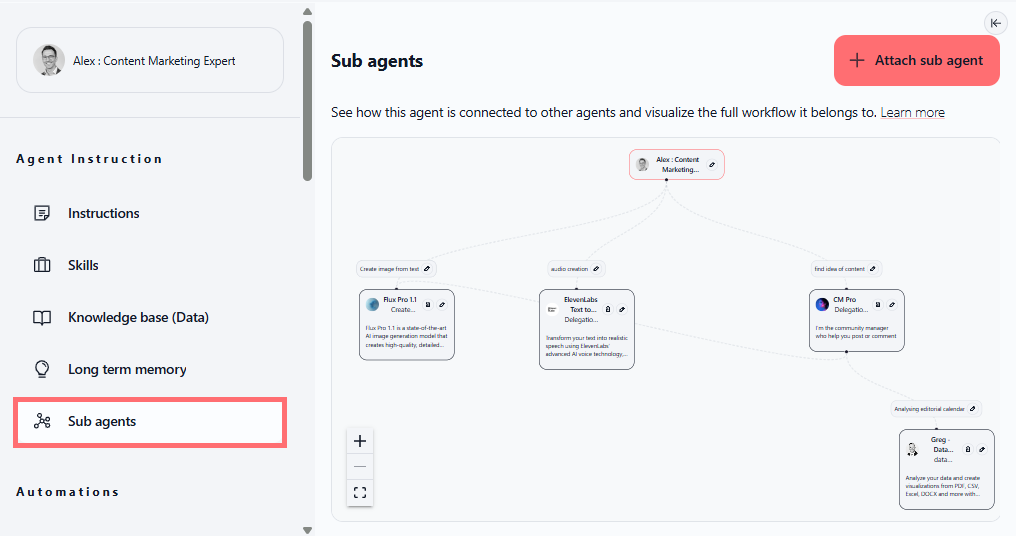
We've given sub agents their own dedicated space in your agent settings, making it easier to visualize and manage multi-agent workflows.
Sub agents: visualize your agent network
You can now see exactly how your agents are connected and what workflows they belong to, right from your agent configuration. The new sub agents panel shows a visual map of your agent architecture, helping you understand your multi-agent system at a glance. Attaching new sub agents is just one click away.
What you can do:
View a visual diagram showing how agents are interconnected
See the full workflow each agent belongs to
Attach new sub agents directly from the panel using the "Attach agent" button
Support nested sub agents (agents with sub agents that have their own sub agents)
Manage sub agents from the Skills section (view or delete)
Where to find it:
Agents → Edit agent → Sub agents (in the left sidebar)
Available on: All Swiftask plans
How to test it:
Navigate to Agents and select an agent to edit
Look for Sub agents in the left sidebar
Click the "+ Attach agent" button
Select an agent to attach as a sub agent
Verify the visual diagram appears showing the connection between agents
Try attaching multiple sub agents to create a more complex workflow
Test nested sub agents by attaching an agent that itself has sub agents
Delete a sub agent from the Skills section to confirm management works smoothly