Lock your production agents to prevent accidental edits — Update March 2026
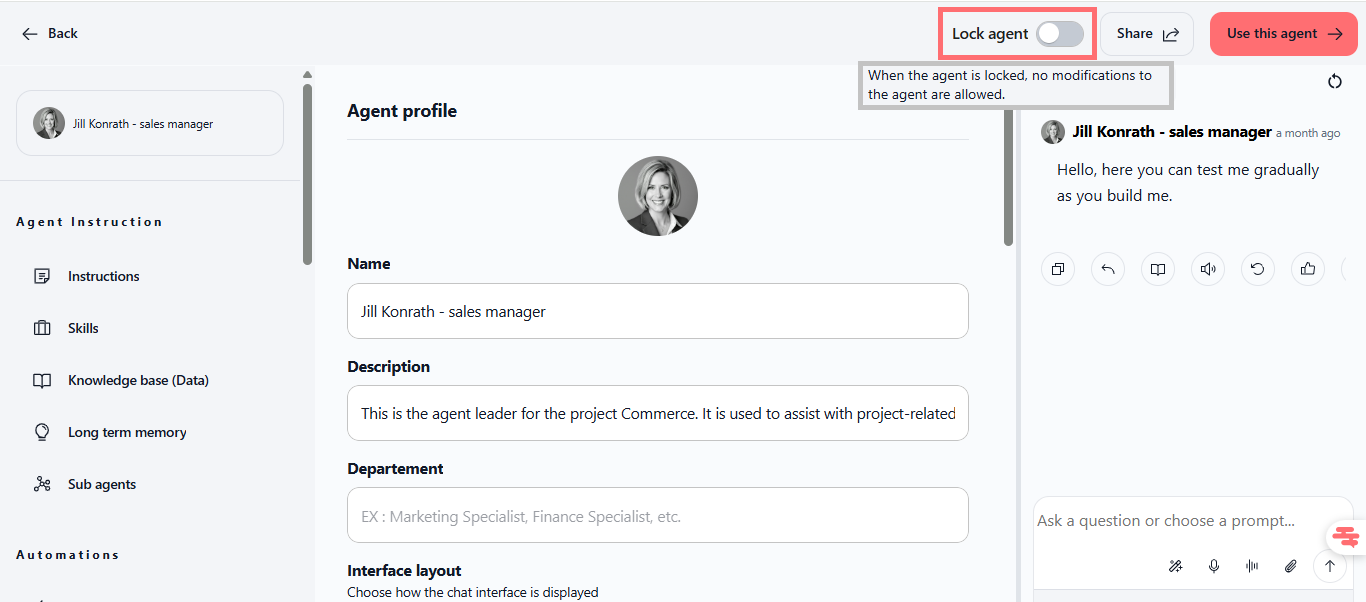
We've added agent locking so you can protect your production agents from accidental changes. Once locked, only owners and admins can modify agent settings—everyone else can still use the agent, but they'll see a clear message if they try to edit it.
Lock agent in production
You can now lock any agent you own or administer to prevent unauthorized changes. Perfect for production agents, shared templates, or any agent you want to keep stable. When locked, all configuration changes are blocked for regular users—they'll see a helpful error message asking them to contact the owner or admin.
Turn the lock on or off with a single toggle
Only owners and admins can lock or unlock agents
Locked agents remain fully usable in chat for everyone with access
All agent settings are protected: prompt, skills, data sources, sharing, duplication, and more
No impact on usage, credits, or performance
Find it: Agent page → top section → "Lock agent" toggle (next to Share and "Use this agent" buttons)
Testing the feature:
Open any agent you own or administer
Click the "Lock agent" toggle at the top of the page (it will turn on and stay highlighted)
Try to edit the agent settings as a regular user—you'll see a message asking to contact the owner/admin
As owner/admin, click the toggle again to unlock and make changes