Your upcoming events, now smarter and faster — June 2026 Update
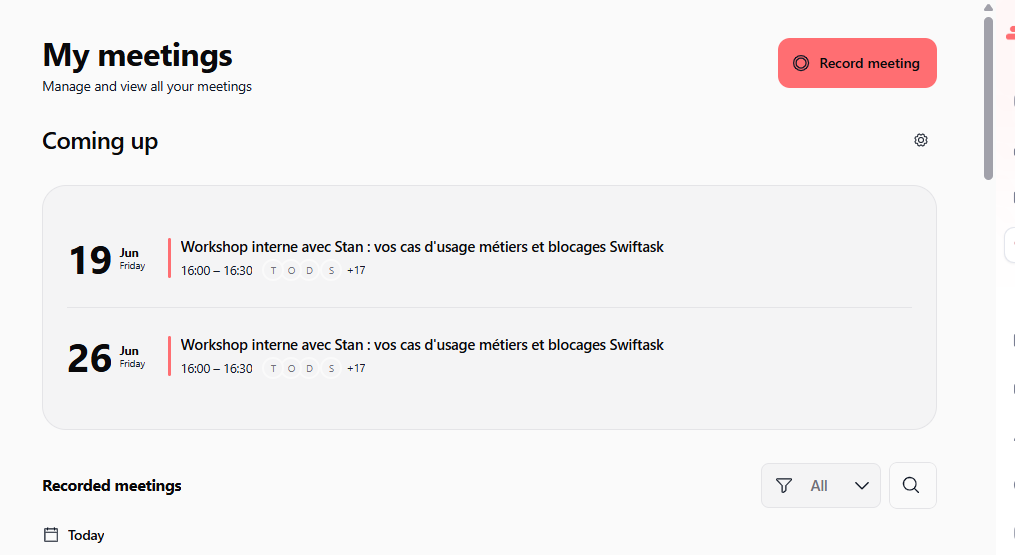
We've redesigned the "Coming up" events list to help you manage your calendar and meetings in fewer clicks. Click any event to instantly access recording options, meeting links, and assistant selection, everything you need to join or record your next meeting is now just one tap away.
Improved "Coming up" events display
The events list is now clearer and easier to scan. Each event shows the date, time, title, and participant count at a glance, making it simple to find what you're looking for without opening individual calendar entries.
Cleaner layout: Date, time, and event title are prominently displayed
Quick visual scanning: Participant indicators show who's attending
Organized by date: Events grouped chronologically for easy navigation
Find it in → Calendar → Coming up (sidebar)
One-click meeting actions
Click any event to open a modal showing all your meeting options. No more hunting for meeting links or switching between apps.
What you can do from the event modal:
View meeting details: See the full event title, date, time, and participant list
Copy meeting link: Grab the Google Meet, Teams, or Zoom link with one click
Join with an agent: Start the meeting with your AI assistant already present (available on all plans)
Record locally: Capture the meeting directly from your Swiftask desktop app with full transcription and AI analysis
Select a meeting assistant: Choose which AI assistant joins the meeting, or set a default for future meetings
Visual feedback: See loading indicators and confirmation messages as actions complete
Supported platforms: Google Meet, Microsoft Teams, Zoom
Find it in → Calendar → Coming up → Click any event
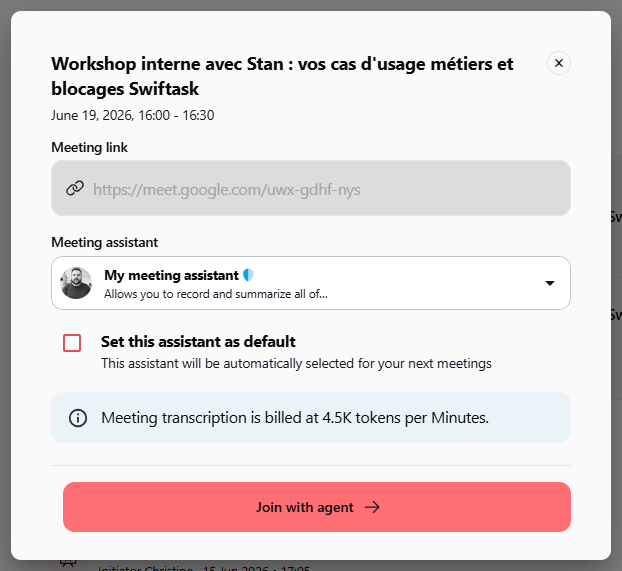
Quick access to meeting recording
Whether you want to record locally on your desktop or have the AI assistant join remotely, both options are now visible and accessible from the same place.
Record locally: Use the Swiftask desktop app to capture audio, transcription, and AI-powered insights
Join with agent: The AI assistant joins your meeting as a participant, visible to all attendees, and handles transcription and analysis automatically
Billing transparency: See token costs upfront (e.g., "Meeting transcription is billed at 4.5K tokens per minute")
Assistant selection: Pick from available AI assistants or set one as your default for all future meetings
Available on all plans: No additional cost; meeting management is included in your Swiftask subscription
How to test it
Navigate to your calendar: Open Swiftask and go to Meeting → Coming up
Click any upcoming event: A modal will appear with all meeting details and action buttons
Try the actions:
Click the link icon to copy the meeting URL
Click "Join with agent" to start the meeting with AI assistance
Click "Record locally" to launch the desktop recording interface
Use the dropdown to select or set a default AI assistant
Watch for feedback: Notice the loading indicators and success messages as actions complete
Test across platforms: Repeat with events from Google Meet, Teams, and Zoom to verify consistency
Improvements
Better event readability: The "Coming up" list now uses clearer typography and spacing, making it easier to spot upcoming meetings at a glance, especially when you have multiple events on the same day.
Faster meeting setup: No more copy-pasting links or navigating to separate settings. Everything you need to join or record a meeting is accessible directly from the event modal, cutting setup time from multiple clicks to one.
Transparent billing: Token costs for meeting transcription are now visible in the modal before you start recording, helping you understand exactly what you'll be charged.
Consistent assistant selection: The meeting assistant dropdown now includes a "Set as default" checkbox, so your preferred assistant is automatically selected for future meetings without manual intervention each time.
Ready to try it?
Update your Swiftask app now to see the new "Coming up" events interface. Click any event and experience faster, smarter meeting management.
Questions? Check out our meeting assistant guide or visit the help center.