AI recommendation from chat
Written By Stanislas
Last updated 22 days ago
Get AI model suggestions tailored to your specific task. When you describe what you need, Swiftask recommends the best-performing AI models to help you accomplish your goal.
Use AI Recommendation when you're unsure which model to choose, want to explore different options, or need the best tool for a specific task like document analysis, code generation, or creative writing.
Overview
AI Recommendation is a feature that helps you discover and select the right AI model for your needs. Simply describe your task in the Chat input field, and Swiftask analyzes your request to suggest the most suitable models. Each recommendation shows the model's strengths, capabilities, and whether it's available in your plan. You can instantly switch to any recommended model or start a new chat session with it.
This feature takes the guesswork out of model selection and helps you use the right tool for every job.
Prerequisites
To use AI Recommendation, you need:
A Swiftask account (sign up at swiftask.ai)
Access to Chat
At least one AI model available in your workspace or plan
AI Recommendation is available to all Swiftask users.
Step-by-step guide
1. Open Chat
Navigate to Chat in the left sidebar. You're now in the Chat interface where you can request AI model recommendations.
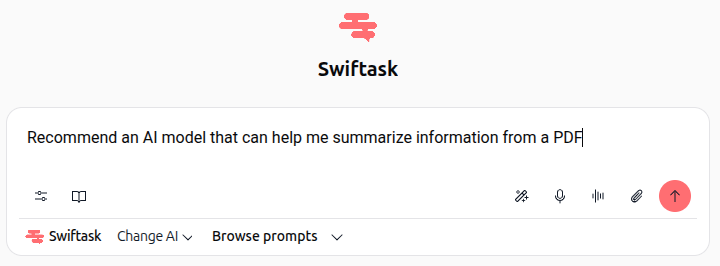
2. Describe your task in the input field
Click inside the input field at the bottom of the screen (it says "Ask a question or request advice on AI for a specific task...").
Type a clear description of what you need help with. Be specific about your task or goal.
Example prompts:
"Recommend an AI model that can help me summarize information from a PDF"
"Which model is best for writing code in Python?"
"I need to analyze a large dataset and generate insights. What should I use?"
"Which AI is best for creative writing and brainstorming?"
3. View AI recommendations
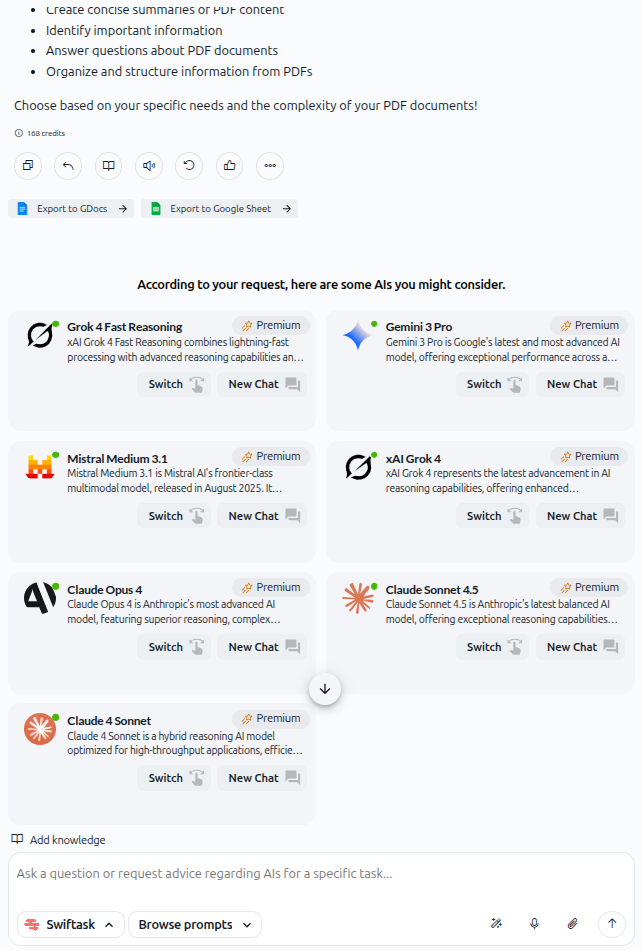
Press Enter or click the send button (up arrow icon). Swiftask analyzes your request and displays a list of recommended AI models.
Each recommendation card shows:
Model name – The name of the AI model
Description – A brief explanation of what the model excels at
Premium indicator – Shows if the model requires a Premium plan
Switch button – Instantly switch to that model in your current chat
New Chat button – Start a fresh conversation with that model
![Screenshot: AI recommendation results showing multiple model cards including Grok 4 Fast Reasoning, Gemini 3 Pro, Mistral Medium 3.1, xAI Grok 4, Claude Opus 4, Claude Sonnet 4.5, and Claude 4 Sonnet, each with descriptions, Premium badges, and action buttons]
4. Select a model
You have two options:
Option A: Switch to the model in the current chat
Click the Switch button on any recommendation card. The model selector at the top of the Chat interface updates to show your chosen model, and you can immediately start using it for your task.
Option B: Start a new chat with the model
Click the New Chat button on any recommendation card. A fresh chat session opens with that model already selected, keeping your recommendation request separate from your actual work.
5. Start using the selected model
Once you've switched to or opened a new chat with your chosen model, type your actual request or question in the input field.
The AI will respond using the model you selected, optimized for your specific task.
Practical use cases
Summarizing documents
You have a 50-page PDF report and need a quick summary. Type: "Recommend an AI model that can help me summarize information from a PDF." Swiftask suggests models known for document analysis. You click Switch, upload your PDF, and get a concise summary.
Code generation
You're learning a new programming language. Type: "Which model is best for writing and explaining code in Python?" Review the recommendations, select a model known for coding tasks, and start asking coding questions.
Creative projects
You're brainstorming ideas for a marketing campaign. Type: "Which AI is best for creative writing and brainstorming?" Switch to a model known for creative tasks, and let it help you generate campaign concepts.
Data analysis
You have a dataset to analyze. Type: "I need to analyze a large dataset and generate insights. What should I use?" Select a model recommended for analytical tasks, and start exploring your data.
Tips & best practices
Be specific about your task
Instead of "Which model should I use?" say "I need to analyze financial data and create visualizations." Specific requests lead to better recommendations.
Check the Premium indicator
Some models may require a Premium or Teams plan. The recommendation card shows this clearly. If you don't have access, consider upgrading or choosing a different model.
Try multiple models
Different models have different strengths. If one doesn't quite work for you, go back to the recommendations and try another. You can always compare results.
Read the description
Each recommendation includes a brief description of the model's strengths. Read these to understand why it was recommended for your task.
Use Switch for quick testing
The Switch button lets you test a model without starting a new chat. This is perfect for comparing models on the same task.
Troubleshooting
Issue: I'm not seeing any recommendations
Cause: Your request might be too vague or not related to AI model selection.
Fix: Rephrase your request to clearly describe what task you need help with. Example: Instead of "Help me," try "Recommend an AI model for writing blog posts."
Issue: The recommended model isn't available in my plan
Cause: Some models require Premium or Teams plan membership.
Fix: Check the Premium indicator on the card. Either upgrade your plan or select a different model that's available in your current plan.
Issue: The recommended model doesn't seem right for my task
Cause: The recommendation was based on your description, but the model's actual strengths may differ.
Fix: Try another recommended model, or ask for a more specific recommendation. Example: "I need the fastest model for real-time responses."
Additional resources
Chat – Getting started – Learn the basics of Chat and its interface
Browse and change AI models – Understand all available AI models and their capabilities
Using agents from Chat – Invoke specialized AI agents for complex, repeatable tasks
Ready to find the perfect AI model? Open Chat now, describe your task, and let Swiftask recommend the best model for you.
Was this helpful?
Still need help? Ask the team